MusicGo - MP3 Music Player
- 4.8
- Rating
- 5.00M
- Installs
- Free
- Price

 Analysis by App-foxy
I tried MusicGo - MP3 Music Player as a straightforward way to keep locally available music within reach, and its appeal became clear quickly: it is aimed at listening rather than turning music into a social network, recommendation service, or complicated library project. That focus matters for anyone who wants fewer distractions, especially when a connection is unreliable or when a familiar playlist is more useful than a stream of suggestions.
MusicGo is a free music and audio app from IPLUG. It is suitable for Everyone, works on Android 7.0 and later, and its current version is 1.3.9. The app has reached over five million installs and holds a 4.8 average from around thirty-six thousand ratings, which suggests that its basic approach is resonating with a large audience. I would still judge it by a more practical question: can I find something to play quickly, control it comfortably, and rely on it in the situations where streaming is inconvenient?
How MusicGo feels to use in everyday listening
I find a focused music player earns its place when it makes the everyday choice—what to play, and how quickly—feel effortless rather than turning listening into another task. In this section, I look at the small habits and practical trade-offs that shape that experience over time, then consider whether the app remains useful once the first-week appeal wears off.
You May Also Like

 Blood Strike: 2.5 Anniversary
Blood Strike’s Loadouts Turn Every Drop Into a Tactical Gamble
A close look at Blood Strike’s custom loadouts: how fast access to signature weapons reshapes its battle royale rhythm, rewards preparation, and narrows the gap between fights.

 Pandora - Music & Podcasts
Pandora’s Music Is Easy to Start, but Harder to Recover
Pandora’s strength is its low-effort path from a seed to a station. Its weak spot is how much confidence it asks you to place in connection, setup, and quiet recovery.

 8 Ball Pool
 Is Built on Rivalries, Rematches, and Routine
A close look at the rivalries, rematches, shared routines, and unanswered safety questions that turn a quick pool match into a persistent mobile community.

 Samsung Music
’s Quiet Strength Is Playing What You Already Own
Its reach comes less from spectacle than from dependable access to a personal library. That simplicity is both the app’s strongest retention engine and its ceiling.

 AccuWeather: Weather Radar
AccuWeather Review: A Quick, Clear Forecast for Everyday Decisions
For everyday plans, the best forecast is the one you can understand quickly. AccuWeather makes rain timing, radar, and local conditions easy to act on, with a few trade-offs.

 Hill Climb Racing
Why Hill Climb Racing Still Turns Crashes Into One More Run
A tiny car, a bumpy hill and one more upgrade: Hill Climb Racing keeps resurfacing because its simple chaos makes every near-miss feel personal.
More From Our News Desk



Readability and navigation come before decoration
The strongest part of a simple player is often what it refuses to make you do. With MusicGo, the useful mental model is local listening: open the app, look through the music available on the device, choose something, and start playback. That is a much calmer experience than opening a streaming service and moving through home-page promotions, subscriptions, recommendations, podcasts, and account prompts before reaching the album I actually wanted.
That simplicity can help people who prefer predictable navigation. If you are not comfortable with dense menus, constantly changing recommendations, or several layers of content, a dedicated player is easier to understand. I also found this approach helpful when I wanted to hand my phone to someone else and let them choose music without explaining an entire service ecosystem.
There is a trade-off, though. A local player depends heavily on how clearly your own music collection is organized. If files have inconsistent artist names, missing album information, or vague filenames, browsing can become less comfortable than the clean catalog offered by a streaming platform. MusicGo can make playback convenient, but it cannot automatically turn a disordered collection into a perfectly labeled one.
For better readability, I would prepare the library before relying on it. Consistent album and artist names make scanning easier, while a smaller set of carefully arranged folders can reduce the amount of searching. This is one of the less obvious lessons with an offline player: the app may be simple, but the quality of the experience is partly determined by the information attached to your music files.
The app’s store short description is simply “MusicGo,” while its broader purpose is clear from the product itself: it is a music player for listening on the move. That narrow identity is useful. I do not open it expecting editorial discovery or a large online catalog; I open it when I want the music I already have available without unnecessary steps.
Comfort for different motor and sensory needs
Music controls are a good test of practical accessibility because they are used while walking, commuting, cooking, or doing another task. A player becomes more useful when the essential actions are easy to locate and do not require precise interaction every time. In my experience, MusicGo’s value here comes primarily from its focused purpose: fewer competing controls can make play, pause, track selection, and volume-related actions easier to understand than they would be inside a much larger media app.
That does not mean every user will find it equally comfortable. People with limited fine-motor control may still struggle with small touch targets, repeated tapping, or trying to select one item in a long list. People with low vision may need larger system text, stronger display contrast, or device-level accessibility tools. I would not treat the app’s clean purpose as proof that it meets every accessibility need; it simply gives the interface less work to do.
For users who are sensitive to visual clutter, the offline-player format can be a relief. There is less pressure to interpret promotional artwork, moving recommendations, or a busy stream of changing content. On the other hand, listeners who need strong visual confirmation may want to check how clearly their own library appears on their particular phone. Album art, file labels, and list density can affect how quickly a person recognizes the right track.
A useful habit is to create a small set of dependable listening choices rather than searching through the whole library during a busy moment. A folder for commuting, another for concentration, or a short collection for exercise can reduce the number of precise taps. This is not a glamorous feature, but it is a real workflow improvement: organization can compensate for the lack of a large, personalized discovery system while also making the app easier to use with one hand.
For anyone who relies on screen readers or other assistive technologies, the most sensible approach is to test the core path on the device before moving an entire collection into the app. The important check is whether the music labels and playback controls are announced in a useful order. I would not assume that an app being simple automatically guarantees a smooth experience with every assistive setup.
Why offline listening helps in real situations
The most convincing reason to use MusicGo is situational rather than technical. Imagine a long train ride through areas with patchy coverage. With a streaming service, playback may depend on connection quality, prior downloads, account status, and the service’s own app behavior. With music already stored on the phone, the main task is simply choosing what to hear. That makes the experience calmer and more predictable.
The same applies to travel, underground routes, rural drives, or places where you want to conserve mobile data. It can also suit someone who shares a device with a family member and wants music to remain available without handing over a streaming account. For a listener who has already built a personal MP3 collection, a dedicated player may be more practical than paying for a catalog they rarely browse.
Offline playback can also support concentration. I like the idea of choosing an album before starting work and avoiding the temptation to keep searching for something better. The limitation is equally important: offline access only helps when the desired files are already on the phone and recognized by the app. It is not a replacement for a music service when you want to discover an artist, access a huge catalog immediately, or listen to music you have not downloaded.
Storage is another everyday consideration. Keeping a large collection on a phone uses space, and people with limited storage may need to be selective. A smaller, well-maintained library often works better than copying everything and then struggling to find one track. I would treat MusicGo as part of a listening routine: transfer the music you genuinely use, remove duplicates, and keep the collection understandable.
Battery expectations should also be realistic. Offline playback avoids the network activity associated with streaming, but music still uses the phone’s audio system and screen interaction. If I were preparing for a full day away from a charger, I would load the music beforehand, reduce unnecessary browsing, and avoid assuming that an offline player makes the phone’s battery unlimited.
Where it differs from streaming services and larger players
Compared with Spotify, YouTube Music, Apple Music, or similar services, MusicGo is less about finding music and more about playing music that is already available. That makes the comparison less about which app has more features and more about which problem you are trying to solve. Streaming wins for discovery, broad catalogs, synchronized accounts, and recommendations. MusicGo wins when independence from a connection and a simpler listening path matter more.
Compared with a phone’s built-in music player, the decision is more personal. The built-in option may already be enough if it scans your files well and gives you the controls you need. MusicGo becomes worthwhile when you prefer its focused identity or want a separate place for offline listening instead of mixing local tracks with other audio. I would not install it merely because every phone needs another player; I would install it because the local-music workflow fits how I listen.
It is also different from a cloud locker. A cloud-based library can make music available across devices, while a local player is tied more closely to the files stored on the current phone. That can be a strength for privacy-minded or connection-conscious listeners, but it is less convenient if you regularly switch devices. Before choosing it as a main player, I would ask whether my music life is mostly phone-based or spread across several devices.
Remaining barriers and small sources of friction
The biggest barrier is not the price: MusicGo is free. The bigger question is whether a listener already has suitable audio files. Someone whose collection lives entirely inside a streaming subscription may gain little from installing a local MP3 player. The app’s offline focus is valuable only when the user is prepared to manage local music.
Library maintenance can also be tiring for people who need highly predictable labels. A collection assembled from different sources may contain duplicate tracks, unusual characters, incomplete metadata, or several versions of the same song. Finding the right item can then require patience, especially on a smaller screen. I would clean up the most-used albums first rather than trying to reorganize everything at once.
Another limitation is the gap between “simple” and “accessible for everyone.” A restrained interface may reduce distractions, but it does not automatically solve contrast, touch precision, text scaling, auditory feedback, or screen-reader navigation. Users with specific access needs should test the actions they perform most often: opening the library, selecting a track, pausing, skipping, and returning to a previous album.
There is also a practical social barrier. Streaming services make it easy to send a song, share a playlist, or continue listening on another device. A local player is more private and self-contained, but that can feel isolated if your routine depends on sharing music with friends. In that situation, I would keep MusicGo for personal offline listening and use another service when discovery or sharing is the priority.
Because the app is free, it is easy to try without making a financial commitment. Still, free does not remove the time cost of importing, labeling, and maintaining a collection. For a person who wants instant access to almost any artist, that setup effort may feel like a step backward. For someone who already owns music files and values control, the same effort can pay off repeatedly.
Who I would recommend it to
I would recommend MusicGo to listeners who keep MP3 files on an Android phone, travel through unreliable coverage, want to limit data use, or prefer a focused player without a large online service surrounding it. It also makes sense for people who want a dependable personal collection for commutes, workouts, study sessions, or quiet listening away from notifications and recommendations.
I would be more cautious recommending it to someone who expects automatic discovery, synchronized playback across several devices, lyrics and social features, or a huge catalog available immediately. A streaming service is the better fit for those needs. I would also hesitate if the person dislikes organizing files or depends on advanced accessibility behavior that has not yet been tested on their device.
One practical setup strategy is to begin with a small test library. Add a few albums with different artists and file names, then check whether browsing feels clear, whether the labels are recognizable, and whether the playback controls are comfortable in the situations where you plan to listen. This reveals more than a quick glance at the store page because it tests the relationship between the app and your own collection.
For a family member who finds large media platforms overwhelming, I would prepare that test library in advance and keep the first screen of choices short. For a commuter, I would create a compact travel selection before leaving home. For a listener with motor or vision considerations, I would adjust the phone’s own display and interaction settings, then verify the essential playback path rather than assuming the default layout will be ideal.
My inclusive verdict after using the player
MusicGo succeeds because it understands a specific need: sometimes I do not want a music ecosystem; I just want my own tracks to play when I need them. Its free access, broad device compatibility, and focused offline purpose make it an approachable option, especially for people who value predictable listening over endless discovery. Its strong public response, including a 4.8 average from around thirty-six thousand ratings, supports the impression that this straightforward approach works well for many listeners.
My recommendation comes with a clear condition. The app is only as convenient as the local library it has to work with, and its inclusive value depends on how comfortable its controls and labels are on each person’s device. I see it as a good choice for reducing connection-related friction and visual overload, not as a universal answer to every accessibility requirement.
If your music is already stored locally, I would give it a try and judge it during a real commute, a low-signal journey, or a focused work session. If your priority is discovering new music, sharing playlists, or moving seamlessly between devices, I would choose a streaming alternative instead. For the right listener, the real advantage is dependable personal playback with fewer distractions, and that is a useful role for MusicGo to fill.
After its release on June 6, 2025, the app has continued developing under IPLUG, with version 1.3.9 currently available. I would keep expectations grounded: this is a practical music and audio tool, not an all-purpose media platform. Within that boundary, it offers a sensible, accessible-minded starting point for offline listening, provided you are willing to organize your music and test the controls that matter most to you.
MusicGo - MP3 Music Player is therefore best understood as a companion for people who want music ready on the phone, whether they are offline, conserving data, or simply avoiding a crowded streaming interface. I would recommend it to that audience, while being honest that listeners seeking discovery, cloud synchronization, or specialized accessibility support may be happier with a different option.
FAQs for MusicGo - MP3 Music Player
01What file formats does MusicGo support?
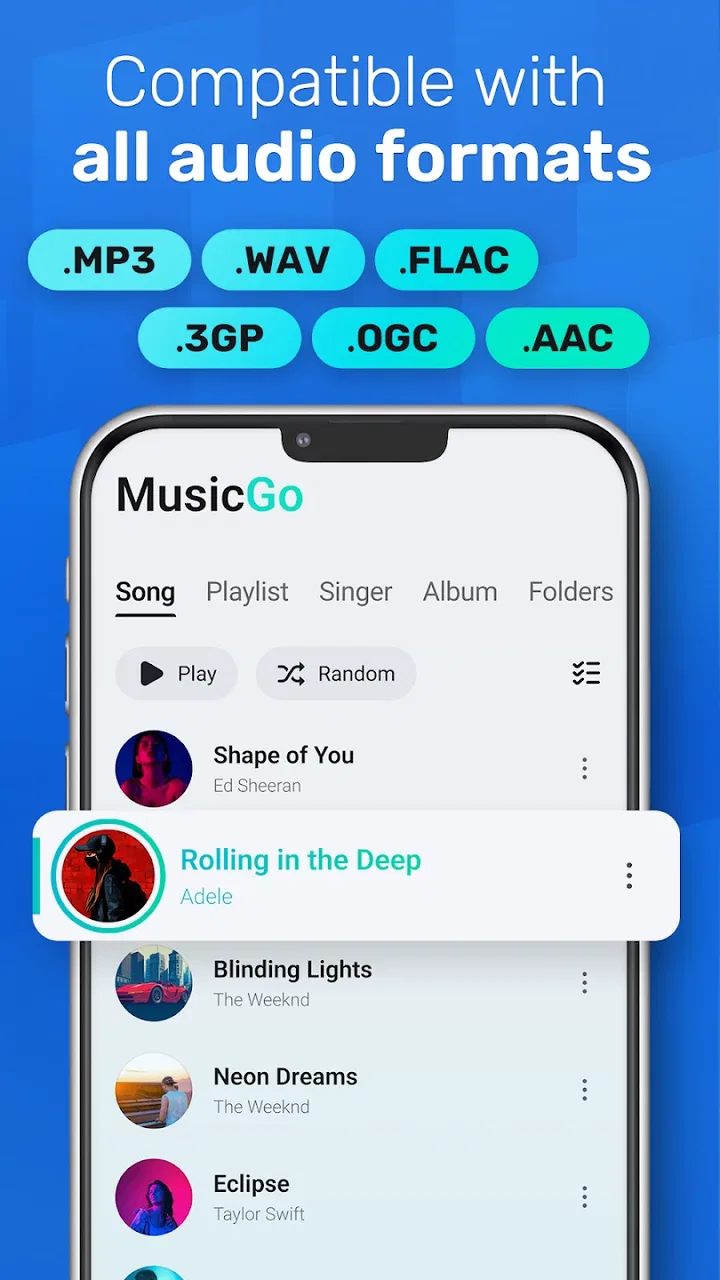
MusicGo - MP3 Music Player supports a wide range of audio formats including MP3, AAC, FLAC, WAV, and OGG. This versatility ensures that users can play virtually any audio file without needing additional converters, making it an excellent choice for music enthusiasts who have diverse music collections.
02Can I use MusicGo offline?
Yes, MusicGo - MP3 Music Player can be used offline. Once you've downloaded your music to your device, you can enjoy your playlists without an internet connection. This feature is particularly useful for users who want to save on data usage or listen to music in areas with poor connectivity.
03Does MusicGo offer playlist customization?
Absolutely! MusicGo allows users to create, manage, and customize playlists with ease. You can organize your music by artist, genre, or mood, and even reorder tracks to suit your listening preferences. This level of customization enhances the user experience and makes music management intuitive.
04Is there a sleep timer feature in MusicGo?
Yes, MusicGo includes a sleep timer feature, allowing users to set a specific time for the music to stop playing. This is perfect for those who enjoy falling asleep to music without worrying about draining their device's battery overnight. Just set it, relax, and let the music lull you to sleep.
05How does MusicGo handle music library updates?
MusicGo automatically scans your device for new music files and updates your library accordingly. This means any new tracks added to your device will appear in the app without requiring manual input. It's a seamless process that ensures your music library is always up-to-date and ready to play.
Pros
- Intuitive user interface design.
- Wide range of audio format support.
- Offline playback capability.
- Customizable equalizer settings.
- Lightweight and fast performance.
Cons
- Contains ads in free version.
- Limited features without premium.
- No podcast support available.
- Occasional crashes reported.
- No lyrics integration support.

MusicGo - MP3 Music Player
Gallery